
Twitter allows us to embed various widgets on our websites that display tweets, timelines, or profiles. This way we can interact directly with Twitter from the site using them. To do this it uses a proprietary file called widgets.js, which is simply a JavaScript library for loading and formatting the content of the various widgets on the web.
This file is embedded in millions of web pages and is served close to 300,000 times per second. Twitter updates this file weekly to fix bugs and add new features in a completely transparent way for users. Therefore, deploying this library is critical for Twitter and needs to be done as safely as possible. Twitter considers a deployment safe if it is:
- Reversible: the deployment must be able to be undone quickly, safely, and reliably. If an error is detected in the newly deployed code, there must be mechanisms that allow the code to return to a stable state almost immediately.
- Incremental: we cannot assume our code is 100% error-free, so the deployment should be possible in phases. This way, if an error is detected, it would not affect 100% of users.
- Monitorable: when doing a phased deployment, it is necessary to create tools to monitor the state of that deployment and check in real time that the code is working as it should. If an anomaly is detected at any point during monitoring, the deployment could be easily aborted (assuming the deployment is reversible).
How the Deployment Works#
Because widgets.js is a widely used file with a well-known name (its URL is platform.twitter.com/widgets.js), it includes no version number in its name, which makes it difficult to control the progress of its deployment.
Twitter has preferred to keep a single unversioned file for the convenience of its users. If the file had a version number, the deployment would consist of forcing the user to change the script's load address. This is what most JavaScript libraries like jQuery or Bootstrap do.
By always having the same load address (additionally, browsers use their own cache to keep a local copy), the problem now lies in invalidating the old file in Twitter's own DNS and pointing to the new one.
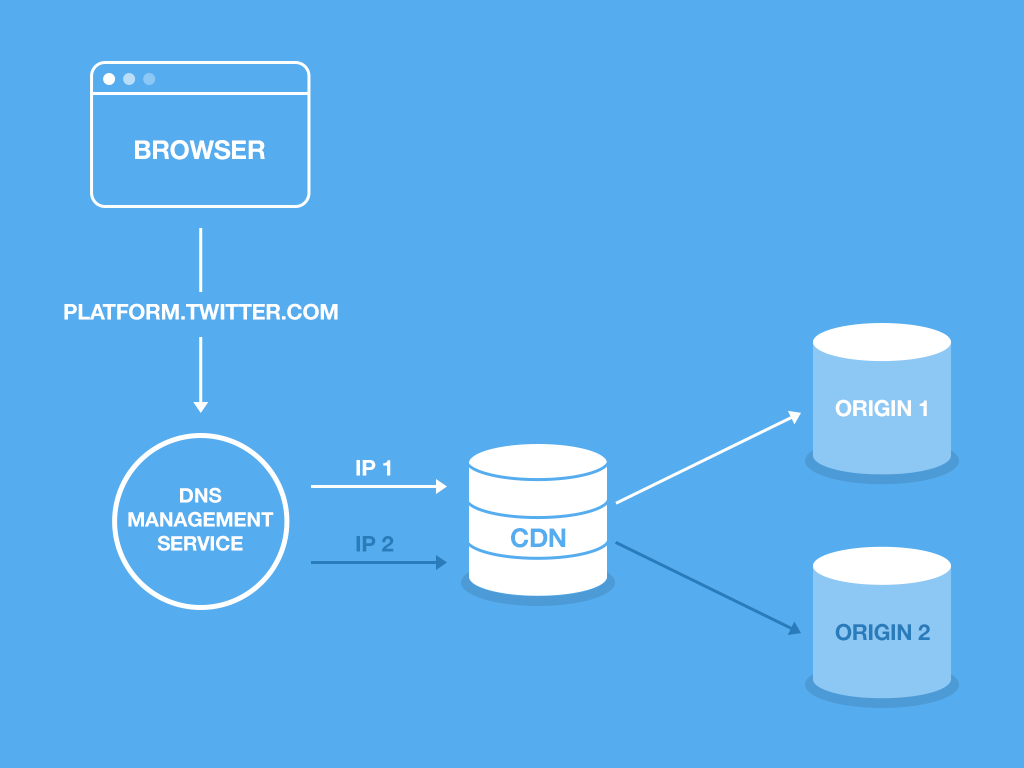
To achieve this, Twitter has had to create its own configuration to carry it out.
DNS Management Service: this service allows Twitter to control how platform.twitter.com resolves to an IP address. Using geographic regions for the phased deployment, they use the following rules:
- Phase 1: 5% of traffic from region A gets the resource called IP2; the rest uses IP1.
- Phase 2: 100% of traffic from region A uses IP2 and the rest uses IP1.
- Phase 3: 100% of traffic uses IP2. This includes TOR traffic and any request whose region is unknown.
CDN (Content Delivery Network): this service allows static resources to be served quickly to many points around the world. Twitter has theirs configured so that if a request comes from IP1, the file is served from origin 1; otherwise it is served from origin 2.
Origin: a storage service like Amazon S3 where the widgets.js file is uploaded. The CDN asks the origin for the latest version of the file when it is served.
By default all requests are served by origin 1. The deployment begins by uploading a new version of the widgets.js file to origin 2. Twitter then starts moving traffic towards origin 2 using the phases described above in the DNS. If the deployment is successful, the files are copied from origin 2 to origin 1 and all traffic is reset to origin 1.
Conclusion#
In summary, what Twitter has are two copies of the widgets.js file: the current one (which is in origin 1) and the new one (which is in origin 2). Using phases, it "forces" its users via DNS to download the new version instead of the old one, and once they are confident everything went well, they overwrite the old origin 1 with the new origin 2.
This gives us a fairly general view of how something as simple as deploying a single file to clients involves an entire engineering process behind the scenes, due to the enormous concurrency and usage of the software.

